What is That Weird Cylinder on Your Laptop Charger?
- Technology
- Exien
- · Updated
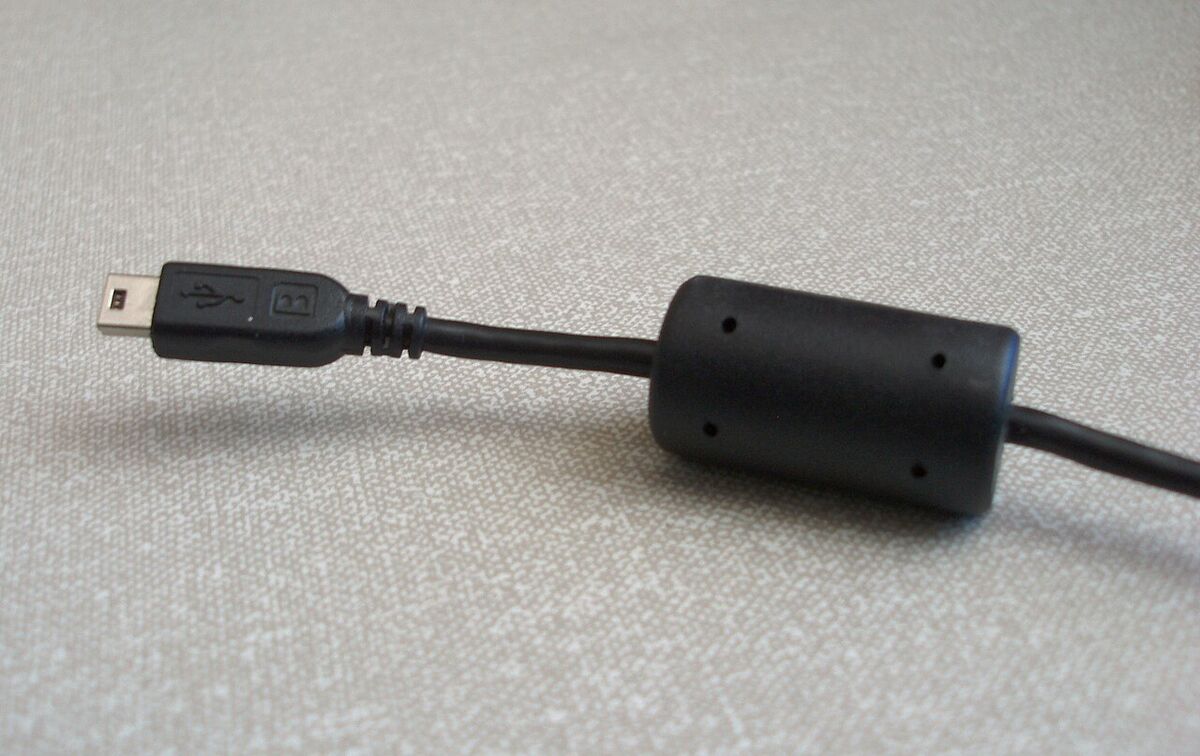
We've all seen it—that chunky, cylindrical bump near the end of your laptop charger or monitor cable. You probably use it every day, but have you ever stopped to wonder what it actually does? Is it just a weird design choice to keep the cable from bending? The truth is, this little cylinder plays a massive role in keeping our electronics safe and working smoothly. Let's uncover the secret behind this mysterious bump!
The Real Name: The Ferrite Bead
That bump on the end of your cable is officially called a ferrite bead (or a ferrite choke or ferrite core). While it might look like a solid chunk of plastic from the outside, the magic is on the inside. The plastic casing holds a hollow cylinder made of ferrite, which is a magnetic material made from a mix of iron oxide and other metals.
If you've ever bought a loose cable and noticed a clip-on version of this bead included in the package, you know it's not just a decorative addition. It's a crucial piece of hardware.
What Does a Ferrite Bead Actually Do?
So, why does your cable need this bump? Its main job is to block electromagnetic interference (EMI).
Whenever electricity flows through a cable, it generates an electromagnetic field. High-frequency currents flowing through cables can essentially turn them into little antennas, broadcasting unwanted signals. Conversely, the cable can also act as a receiving antenna, picking up stray signals from other electronic devices nearby.
If these unwanted signals (or "noise") travel into or out of your devices, things can go wrong fast:
- Your monitor might start flickering or showing static.
- Your speakers could emit an annoying high-pitched whine or buzz.
- Your Wi-Fi or Bluetooth connections might drop randomly.
- In extreme cases, the interference could cause your device's internal components to malfunction.
The ferrite bead acts as a filter. It essentially absorbs this high-frequency noise and dissipates it as heat. It's incredibly smart—it allows the clean, necessary power or data signals to flow through smoothly while trapping and destroying the messy, interfering frequencies.
Why is it Always at the End of the Cable?
If you look closely, you'll notice the ferrite bead is almost always positioned right before the plug that goes into your laptop or device. There's a very scientific reason for this placement.
The most effective place to block interference is right at the gateway—just before the noise can enter the device from the cable, or just before the device can send noise out through the cable. By placing the filter as close to the device as possible, it ensures your laptop stays protected from external electronic chaos.
Will My Device Break Without One?
You might be thinking, "My smartphone charger doesn't have a bump like this!" You're absolutely right. Many modern, thinner cables like those for smartphones don't have visible ferrite beads.
This is because internal circuit design has advanced tremendously. Many modern devices now have microscopic noise filters built directly into their internal motherboards. However, for devices that draw a lot of power (like laptops) or transmit heavy data that is very sensitive to interference (like monitors), the external ferrite bead acts as a necessary double layer of protection.
If you ever need to replace a damaged cable that originally had a ferrite bead, it's always best to choose a replacement that also has one. It's a small detail that helps keep your gadgets running smoothly for years. Next time you plug in your laptop, you can appreciate that little bump for being the silent bodyguard of your electronics!